Webb
Member
-
Joined
-
Last visited
Everything posted by Webb
-
-
-
-
-
Arrest JESSE Duke!
-
-
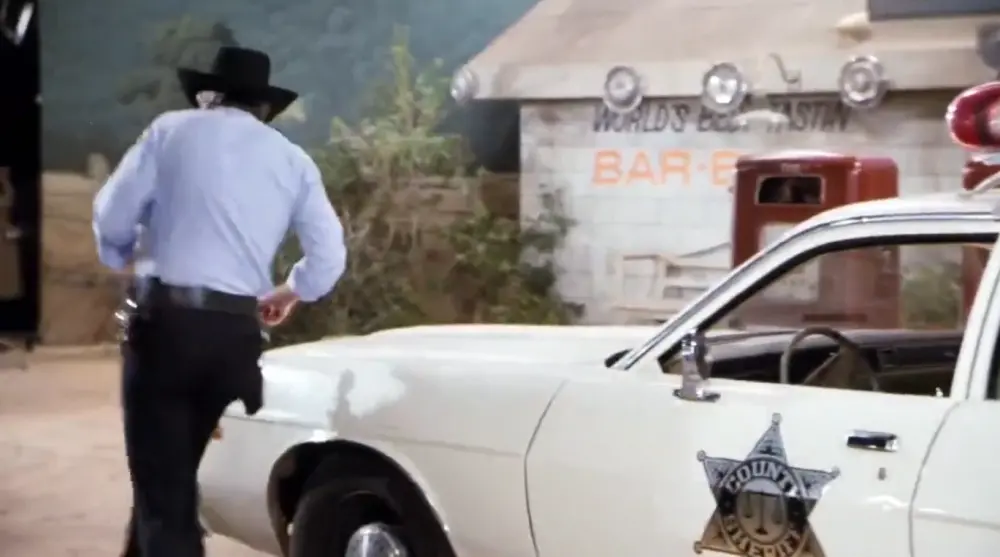
Was watching Dukescam Scam yesterday and noticed this. You can see the end of the set and looks to be a lamp in the corner. Not sure if this has been mentioned before
-
CATHERINE Bach
-
Somehow T was missed so, TAMMY Wynette sang on an episode continue with V
-
-
It’s never a QUIET day in Hazzard with the Dukes
-
Dukes IS the best tv show ever made
-
Mason DIXONS Girls
-
Happy 4th of July!
-
A little late but same to you! I haven’t any had Canada Day plans the last few years but I was sick all weekend so there’s that.
-
-
Raw liver and black coffee (Boss Hoggs breakfast)
-
-
Love Joe Diffie! Gone way too soon.
-
Bo and Luke RACED the general lee.
-
Very sad to hear that Rick has passed away. I would have loved to meet him and get an autograph. He was only at Cooter's Place just this past Sunday. Rest in Peace Rick (Cletus) I hope you're with the rest of the Dukes cast that has gone over the rainbow bridge.
-
-
IRA Grant (Hazzard Orphanage Caretaker)
-
Hello Roger. Downloading is when you’re putting it on your computer, uploading is when you are trying to show an image or attachment to others.
-