All Activity
Past hour
-
-
-
Meadowmufn... You're awesome! 😎
-
-
-
If you liked the first new theme after the version 5 upgrade, you can select it from the theme menu at the bottom of the page.
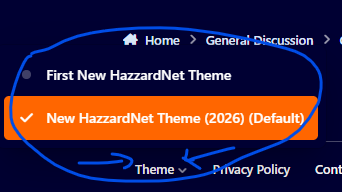
-
@Hobie Hartkins I fixed the colors as best as I could. If the layout needs more tweaking, I can do that, too. At least it's looking a little more like the old HazzardNet now. I am not a fan of change, especially if it's forced upon me!
-
Alright! Once I figured out where all the settings were, it was a lot easier to change the colors. I think this is a pretty good approximation of the old theme. If you find any issues, comment in this thread. Once I figure out how, I will be making the first modern theme available as a selection for members, but otherwise this new theme will be the default.
Today
-
-
-
Ok, I managed to fix the menu so it's not yelling at you. 😂 I also made the HazzardNet header larger. Didn't know I could do that! If you have specific things you want fixed, list them here. Be sure to tell me if you're using a different theme from default. Things like: Color change (which color to which color, include screenshot if possible) Font style Font size Layout changes I'll do what I can to make the site look more like it used to within reason.
-
Yeah, I'll be experimenting when I have time. I think I will tweak the dark mode first or just create a new theme to experiment with to see if I can bring it back more towards the original colors and I'll make sure the header is on that one. That way, if I screw up, it's not affecting the default theme.
Last week
-
What a race we had in Italy today. Charles Leclerc pushed team mate Lewis Hamilton onto the gravel on the first lap dropping Lewis to 10th. George Russell took the lead at the start of lap 2. At the end of lap 2, Charles went off at the final bend, hitting the barrier and bringing out a red flag. Lewis made a good restart, but the real story was Kimi Antonelli moving through the field. With his grid penalties he started 19th (of 22), but was already up to 12th at the restart. George had a few laps swapping the lead with Max Verstappen, but behind them Kimi was coming through and had made it up to second by lap 16. He then battled his team mate for first and second places. Lewis spent a lot of the race trading places with Oscar Piastri, but probably should've swapped tires under the virtual safety car which came out at just over half distance. Kimi and Max did pit, and quickly made back the places. Kimi took the lead for the final time on lap 50 (of 53) to become the first Italian winner of the Italian Grand Prix since Ludovico Scarfiotti in 1966. He was joined on the podium by George and Max ahead of the two McLarens and Lewis. Pole sitter Pierre Gasly finished seventh. I can't remember the last race with this much overtaking, and to see Kimi make it from 19th to first was amazing. He now holds joint second place behind John Watson for win from farthest back. You can see the highlights here. Only a week to wait before the Spanish Grand Prix from Madrid.
-
The Dukes of Hazzard Season 2 on TV Stunter's new channel https://youtube.com/playlist?list=PLJKwT6gubZx0&si=C00c42cM3SQpkIr7
-
-
I'll hold my hands up - I'm not great with change. I've lived with the new layout for 48 hours now, and it's still not gelling with me. I completely understand the need for the upgrade and appreciate the work put in by Meadowmufn, but the site feels like it's lost its identity. The default scheme on my laptop is a really bright background (white or almost white) with gray text which I find hard to read. I switched to the HazzardNet theme which allowed me to select Dark Mode, but that loses the HazzardNet header. On my phone, dark seems to be the only option, and again the header is missing. Going to Forums now shows a load a tiles which take longer to scroll down and aren't as clear as the old list format.. Finally for now, I don't like the menus being all in capitals. Capital letters on the internet always feel like shouting. I remember when the site moved from vBulletin to the last layout and it took some tweaking. Hopefully, it'll be possible to put some of the blue and orange back into the site without too much work.
-
-
😭
-
-
-
I doubt you'll be seeing me as much on here. I'll just keep watching DOH on DVD like I've been doing and that's it.
-
Yeah, it's taking some getting used to. Unfortunately, I had to upgrade because they're discontinuing support for the old version at the end of the year. ☹️
-
Well I'm watching TV and about to watch TDOH. My left eye has a stye and it's been bothering me for several days now. I'm drinking my first beer and about to start my second. I don't know how everybody feels about this new format but I don't like it! The old one was doing just fine! ( That's just my 2 cents!)
-
Qualifying for tomorrow's Italian Grand Prix was tight today. Mercedes have decided to take grid penalties for exceeding their engine component allocation for this year for Kimi Antonelli's car, so he's starting near the back in his home race. Liam Lawson is standing in again for Isack Hadjar at Red Bull, and he's also taking grid penalties. That meant that two of the top teams could use the car being penalized to give a tow to their other car. In Q2, Oscar Piastri blocked Liam, which earned him a 3-place grid drop. Lewis Hamilton had been quick in practice and Q1, but scraped through to Q3 by a thousandth of a second. That must've been a relief as a Ferrari driver in Italy. The real story of the day was Pierre Gasly getting his first pole position after nine years in F1. It's one of those occasions where the whole pit lane seem happy that an unexpected driver achieves something remarkable. His Alpine team are currently 6th of 11 teams, and he's just had his Monaco podium finish belatedly taken away after appeals from other teams. George Russell will start in second. He apparently lost a chess game to Pierre 15 minutes before qualifying and thought he'd beat him on the track. Oscar got third, but will start in sixth after his penalty, promoting the Ferraris to third and fourth. You can see the qualifying highlights here. You can see what a six hundredths of a second difference looks like over a lap with the ghost car comparison of Pierre and George.
-
Come on GENERAL Lee pretend it's me and Boss you're chasing!
-
-
-
-
-
FARMER Perkins (From By-Line Daisy Duke)
-
...it's always the same! 🙂 Nervous
-
Breakdown (Led Zeppelin song Communication Breakdown).
-
The Dukes win against Boss and Rosco EVERY time.
-
Christopher owens joined the community
-
-