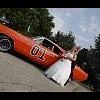
January 30, 200818 yr Hi guys/girls:I just signed up and thought I'd say hi to everyone!I'm a big DOH fan and even got to use the General Lee as my wedding car...I have an AWESOME wife! I'm in Ontario, Canada and hope to meet lots of great people on here.Talk to you later,01getaway
January 31, 200818 yr Welcome to Hazzard County 01getaway. If you want to getaway to the best website on the internet you've just gotten away to the right one. (I'm not making any sense am I?) Buckle up for safety on the Hazzardnet.
January 31, 200818 yr Hey 01getaway!That is a great picture you have, and it is so cool that you got to use a General Lee as your wedding car!I hope you have a great stay at HazzardNet, and enjoy the forums, posts, etc... And Roger is right, buckle up for safety!! General Grant
February 1, 200818 yr Hey, BoJamesDuke here...I like to shout my mouth off on this site lol. ;-)Awsome that you got to use General Lee as your wedding car! I hop emy husband lets me get one for that special day...need a boyfriend though first lol. Welcome to Hazzardnet, hope you enjoy yourself
February 2, 200818 yr Hello 01getaway!Welcome to HazzardNet! I sure hope that you enjoy your stay here. As I can see, you've already had some of the nicest people to come and give you a warm Hazzard welcome. But, trust me, there's still some great people you haven't met yet!So stick around, it sure is fun and interesting! And, that's so cool that you could use the General Lee for your wedding day. How did you find the General?Welcome!Laura Duke
February 3, 200818 yr Author I know a guy who lives near me who owns a General and he told me I could use it if I wanted. It was an awesome time!


Join the conversation
You can post now and register later. If you have an account, sign in now to post with your account.
Note: Your post will require moderator approval before it will be visible.