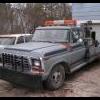
February 24, 201313 yr I've been a fan of the Dukes since they were on TV and making new episodes every week. (yeah, I got some age on me) I own all the seasons on DVD (and the new movie) and have a few die casts of the General.Anyway, I've had a couple Chargers over the years, but had to let them go for one reason or another. I just got a '79 F350 long wheel base wrecker. My intentions are to paint it yellow and put "Hazzard County Garage" on the door. I own a hotrod shop and I thought this would be a cool way to get projects to the shop. Especially considering I've gained a reputation for Ford trucks. My daily driver is a '79 F150 4x4.I'm looking forward to meeting everyone.
February 24, 201313 yr Welcome to HNet. That wrecker project looks fun - I hope you'll keep us updated with your progress.
February 24, 201313 yr You sure sound like the kind of feller who belongs here. We look forward to hearing more from you!
February 24, 201313 yr Author There, I updated my profile a little so you have a better idea of who I am.




Join the conversation
You can post now and register later. If you have an account, sign in now to post with your account.
Note: Your post will require moderator approval before it will be visible.