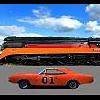
January 20, 201214 yr Lol u guys r a trip. Thats my GL and the S&H is a friend Steve herein NJ apparently he has the largest S&H toy collection and that car is one of three ( 2 which are in The country ) from the a teal TV show. The cop car is Billys. We all just rolled out of Comic Con.PA. I tried to get a shot of us as well as BTTF Delorean and scooby doo van but they rolled out quick.
January 21, 201214 yr Very nice! I can't quite make out the customize license plate on the patrol car with my computer.
January 21, 201214 yr Thanks for sharing the pic, TomBo! As you can see we're having a good time with it. Roger, I think the patrol car's plate says, "I LOVE IT." That's pretty cool, ain't it. I suppose "KHEEHE" and "JITJIT" and "DOHHO" and other Rosco-isms were already taken.
January 21, 201214 yr Yes Brian is correct it does say ILOVEIT. Glad y'all r havin fun with it, what a fantastic weekend we had.
January 22, 201214 yr Awesome! What a great idea for the plate! By the way Brian, why are some things on posts coming up orange? (like license plate on post 52)
January 22, 201214 yr By the way Brian, why are some things on posts coming up orange? (like license plate on post 52)It's an automated link thing we're experimenting with. It's similar in principal to other ad links that you see scattered around here. So far it's not too obnoxious and it picks up a few nickles and dimes. (literally.) All part of keepin' the lights on in the house, if you dig my meaning.
January 23, 201214 yr And it's everybody's favorite color!Yeah, we're subtle like that. Seriously though if they seem too obnoxious, let us know.


Join the conversation
You can post now and register later. If you have an account, sign in now to post with your account.
Note: Your post will require moderator approval before it will be visible.