




Skip to content
View in the app

A better way to browse. Learn more.

Dukes of Hazzard Forums - HazzardNet.com

A full-screen app on your home screen with push notifications, badges and more.

To install this app on iOS and iPadOS
  1. Tap the Share icon in Safari
  2. Scroll the menu and tap Add to Home Screen.
  3. Tap Add in the top-right corner.
To install this app on Android
  1. Tap the 3-dot menu (⋮) in the top-right corner of the browser.
  2. Tap Add to Home screen or Install app.
  3. Confirm by tapping Install.

Lemmamoon

Member
  • Joined

  • Last visited

  1. Murder
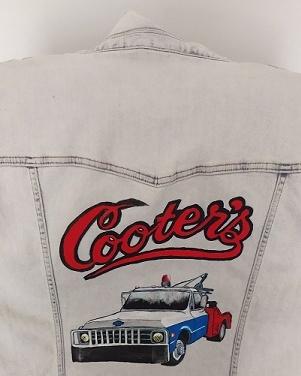
  2. Hi There, I would like to introduce myself here; My natural name is Simone, i was born 25 years ago in a small city in The Netherlands, called Leiden (the city of Rembrandt, and the Mayflower). i earn my keep as a carmechanic, and to keep myself occupied in my sparetime i love to draw, paint (also on the rear of jackets), watch movies, listen to some music and play games on my gameconsole, I love the Dukes, always had, and always will, lately i started to love Cooter the most, i just love it how Ben Jones portrays my kind of perfect mechanic. Current Jacket that i've been working on;

Account

Navigation

Search

Search

Configure browser push notifications

Chrome (Android)
  1. Tap the lock icon next to the address bar.
  2. Tap Permissions → Notifications.
  3. Adjust your preference.
Chrome (Desktop)
  1. Click the padlock icon in the address bar.
  2. Select Site settings.
  3. Find Notifications and adjust your preference.