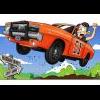
June 13, 201214 yr I did a favor for a good friend of mine recently, and he drew this for me to say thank you. I thought I'd share. The image of me is very accurate; dark work shirt, blue baseball cap and glasses... and when I'm driving the General I'm always smiling!Thanks Austin! I love it, I love it!
June 13, 201214 yr Cool picture. Your friend is very talented. What medium did he use to make the picture - is it computer art or the old-fashioned kind?
June 13, 201214 yr Author It's computer based artwork, but I'm unsure which program he uses Hoss. He does a weekly cartoon for the USAF called "Box D Blues" that gets published in the Air Force Times. Glad you like it Hoss. Next time I see Austin I want to show him your Hazzard Square artwork, specifically the Cooter's Garage section. He'll love that. Cheers!




Join the conversation
You can post now and register later. If you have an account, sign in now to post with your account.
Note: Your post will require moderator approval before it will be visible.