




Skip to content
View in the app

A better way to browse. Learn more.

Dukes of Hazzard Forums - HazzardNet.com

A full-screen app on your home screen with push notifications, badges and more.

To install this app on iOS and iPadOS
  1. Tap the Share icon in Safari
  2. Scroll the menu and tap Add to Home Screen.
  3. Tap Add in the top-right corner.
To install this app on Android
  1. Tap the 3-dot menu (⋮) in the top-right corner of the browser.
  2. Tap Add to Home screen or Install app.
  3. Confirm by tapping Install.

Blast

Member
  • Joined

  • Last visited

  1. Blast replied to mike bull's topic in The General Lee
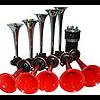
    We have the best Dixie horns playing all 12 notes in both red or chrome trumpets, they are made in Italy and are of the best quality giving years of fun, If you are a Hazzardnet member then we are offering free carriage within the UK, just use the code 01 when prompted on check out for free post.
Account

Navigation

Search

Search

Configure browser push notifications

Chrome (Android)
  1. Tap the lock icon next to the address bar.
  2. Tap Permissions → Notifications.
  3. Adjust your preference.
Chrome (Desktop)
  1. Click the padlock icon in the address bar.
  2. Select Site settings.
  3. Find Notifications and adjust your preference.