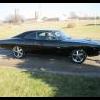
November 24, 201114 yr As most of you know Sonny Shroyer and I, who played Enos on the Dukes of Hazzard TV series are close friends and Im also a Talent Agent for him. Back in 2007 I built him his very own personal Hazzard County appearance car we called ENOS 1. The photos on my Facbook page are the transfomation progress. ENOS 1 Specifications:General Car Specs:Numbers matching near mint "1975 Plymouth Fury Custom" built in July 1975 at the Lynch Road, Michigan assembly plant.Exterior Color was EW1 - Spinnaker White; Repainted to AE Glacier White.Tan High Class Interior with a standard clock. Disc brakes in the front and drum brakes in the rear with brake booster.Built with a 318ci V8 2bbl (LA Motor) engine, connected to a 727 automatic Torqueflite transmission.Luxury options include: Air Conditioning, cruise control, AM radio with dash speaker, and tinted front windshield.Squad Car Conversion Specs:Show authentic fully functional "1971 Sharp 40 Channel 2460 CB radio."Show authentic fully functional "1974 Code 3 Siren/Light Control Box."Show authentic fully functional "1972 48 inch Aerodynic Light Bar" by Federal Signal (with brand new red and blue domes.)Show authentic "Hazzard County Sheriff Decals" provided by the original Hazzard County Stunt team.Show authentic "Confederate Flag" front license plate.Show authentic "Dog Dish" MOPAR hub caps.We sold the car to Dukes Fan Brian Carey in 2009.More photos here: http://www.facebook.com/media/set/?set=a.1355414118736.2049695.1032950102&type=1You will have to log into see them...




Join the conversation
You can post now and register later. If you have an account, sign in now to post with your account.
Note: Your post will require moderator approval before it will be visible.